Mi Xiaomi Redmi POCO SPD FRP Tool – FRP Reset After Bootloader Unlock
If you are looking for a simple utility for supported Xiaomi, Redmi, and POCO SPD devices, the Mi Xiaomi Redmi POCO SPD FRP Tool is designed to help technicians perform service operations on compatible devices after the required bootloader unlocking process has been completed.
This tool is mainly intended for professional mobile technicians, repair centers, and device owners working on devices they own or are authorized to service.
The most important requirement is that the device bootloader must be unlocked before using the supported FRP service function. Users should always verify device compatibility, chipset, bootloader status, and firmware version before starting any operation.
What Is Mi Xiaomi Redmi POCO SPD FRP Tool?
Mi Xiaomi Redmi POCO SPD FRP Tool is a Windows-based mobile servicing utility created for selected Xiaomi, Mi, Redmi, and POCO smartphones using supported SPD/Unisoc platforms.
It provides technicians with a more convenient way to perform supported servicing operations without having to manually execute multiple commands.
The tool is especially useful in repair environments where technicians regularly work with Xiaomi-family smartphones and need a lightweight utility with a simple interface.
Please note that compatibility can vary depending on:
- Device model
- SPD/Unisoc chipset
- Firmware version
- Android version
- Security patch
- Bootloader status
Therefore, always check whether your particular model is supported before performing any service operation.
Bootloader Unlock Is Required
One of the most important requirements of the Mi Xiaomi Redmi POCO SPD FRP Tool is an unlocked bootloader.
The FRP service function should only be attempted after the supported Xiaomi, Redmi, or POCO device has been successfully bootloader unlocked using an authorized or appropriate method.
If the bootloader is still locked, the requested operation may fail or the device may reject the service command.
Before using the tool, confirm:
Bootloader Status: Unlocked
It is also recommended to make a backup of important data whenever possible because servicing operations may result in complete user-data removal.
Supported Brands
The tool is intended for compatible devices from brands such as:
Xiaomi
Selected Xiaomi smartphones using supported SPD/Unisoc platforms may be compatible with the utility.
Redmi
A number of Redmi budget and entry-level devices can use SPD/Unisoc chipsets. Supported models can be serviced after checking bootloader and firmware compatibility.
POCO
Selected POCO models may also be supported depending on chipset and software configuration.
Because manufacturers regularly release new firmware and security updates, exact support may change over time.
Main Features
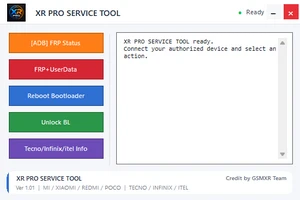
The Mi Xiaomi Redmi POCO SPD FRP Tool offers a simple servicing environment for supported smartphones.
Key highlights include:
- Support for selected Xiaomi devices
- Support for selected Redmi devices
- Support for selected POCO devices
- Designed for compatible SPD/Unisoc platforms
- FRP service functionality on supported devices
- Works after bootloader unlock
- Simple Windows interface
- Fast device servicing workflow
- Lightweight utility
- Easy-to-understand controls
- Useful for professional mobile technicians
- No complicated manual command workflow for supported functions
The exact available functions may depend on the version of the tool and the connected device.
Mi Xiaomi Redmi POCO SPD FRP Tool Requirements
Before starting, users should prepare a compatible Windows computer and ensure that the phone is properly detected.
Recommended requirements include:
- Windows 10 or Windows 11 PC
- Compatible Xiaomi, Redmi, or POCO smartphone
- Supported SPD/Unisoc chipset
- Bootloader already unlocked
- Correct USB drivers installed
- Good-quality USB data cable
- Stable USB connection
- Sufficient battery charge
Using a damaged cable or unstable USB port can cause communication problems during device servicing.
Why Bootloader Status Matters
Modern Android smartphones include multiple security mechanisms intended to protect the device and user information.
The bootloader controls whether the smartphone is permitted to load or accept certain modified or service-level operations.
For this reason, the Mi Xiaomi Redmi POCO SPD FRP Tool requires the bootloader to be unlocked for the supported FRP operation.
A locked bootloader can prevent the requested servicing command from being completed successfully.
Never force an unsupported operation on a locked or incompatible device.
Important Data Warning
FRP-related servicing operations may erase user information from the smartphone.
Before proceeding, understand that data such as:
- Installed applications
- Photos stored internally
- Documents
- Application data
- Device settings
- User accounts
may be removed depending on the selected operation.
If the phone is accessible and contains important information, create a backup before starting.
Who Should Use This Tool?
The Mi Xiaomi Redmi POCO SPD FRP Tool is primarily suitable for:
- Professional mobile repair technicians
- GSM service centers
- Smartphone software technicians
- Advanced users servicing their own devices
- Authorized device servicing professionals
The tool should only be used on a phone that you personally own or have clear permission from the owner to service.
Troubleshooting Device Detection
If your Xiaomi, Redmi, or POCO device is not detected by the tool, first check the basic connection requirements.
Try checking the USB cable, USB drivers, USB port, device mode, bootloader status, and Windows Device Manager.
Avoid repeatedly performing servicing operations if the device is not being detected correctly.
Installing the proper drivers and using a reliable USB cable can solve many common connectivity problems.
Is Mi Xiaomi Redmi POCO SPD FRP Tool Free?
Availability and download information can be provided through GSMXR.
Always download the latest available release from a trusted source because older versions may not support newer firmware or recently released devices.
For the latest updates, supported model information, downloads, and other GSM servicing tools, visit:
GSMXR.COM
Important Disclaimer
This software and information are provided for legitimate device servicing, repair, testing, and educational purposes.
Only use the Mi Xiaomi Redmi POCO SPD FRP Tool on devices that you personally own or have explicit authorization to repair.
GSMXR does not encourage unauthorized access to another person’s smartphone, accounts, or private information.
Device servicing may erase data or cause software problems if performed incorrectly. Users and technicians are responsible for verifying device compatibility and creating backups before proceeding.
Conclusion
The Mi Xiaomi Redmi POCO SPD FRP Tool can be a useful addition to a mobile technician’s software collection when working with supported Xiaomi-family smartphones using compatible SPD/Unisoc platforms.
Its main advantage is providing a straightforward interface for supported servicing functions without requiring a complicated manual workflow.
However, users should remember the primary requirement:
The supported device bootloader must be unlocked before using the FRP service function.
Always verify the exact device model, chipset, firmware, drivers, and bootloader status before performing any operation.
For more Xiaomi, Redmi, POCO, Android servicing tools, downloads, updates, and mobile repair information, keep visiting GSMXR.COM.
Mi SPD FRP Tool, Xiaomi SPD FRP Tool, Redmi SPD FRP Tool, POCO SPD FRP Tool, Xiaomi FRP Tool, Redmi FRP Tool, POCO FRP Tool, SPD FRP Tool, Unisoc FRP Tool, Xiaomi bootloader unlock FRP tool, Xiaomi Redmi POCO FRP reset, Mi FRP Tool Download, Xiaomi service tool, Redmi service tool, POCO service tool, GSMXR FRP Tool