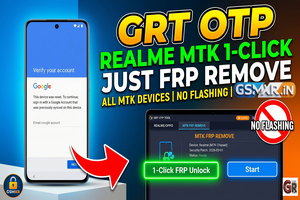
Realme devices using the Qualcomm (QC) and MediaTek (MTK) chipsets. Using the GRT (Global Repair Tool) OTP method for a 1-click FRP removal without flashing is a huge time-saver, as it keeps the existing firmware intact.
Here is a breakdown of how this process typically functions and what you need to ensure success:
Key Features of the 1-Click Method
- No Flash Required: Since you aren’t writing a full firmware file, the risk of “bricking” or getting stuck in a boot loop is significantly lower.
- Universal CPU Support: Targets both MTK (Helio/Dimensity) and Qualcomm (Snapdragon) architectures found in Realme’s lineup.
- Efficiency: Uses the “OTP” (One Time Password/Auth) server bypass to authorize the command via the device’s EDL (Qualcomm) or BROM/Preloader (MTK) mode.
Preparation Checklist
To ensure the 1-click removal works without errors, verify the following:
1. Driver Setup
- MTK: Ensure LibUSB or MTK Universal Drivers are installed to handle the handshake in BROM mode.
- Qualcomm: Ensure Qualcomm HS-USB QDLoader 9008 drivers are active in Device Manager.
2. Connection Modes
- For MediaTek: Usually requires powering off the device and holding Volume Up + Volume Down while plugging in the USB cable.
- For Qualcomm: Many newer Realme models require EDL Mode. If the device doesn’t have a button combo for EDL, you might need a specialized EDL cable or a test point on the PCB.
3. GRT Tool Execution
- Launch the GRT Dongle/Tool and navigate to the Realme/Oppo section.
- Select the FRP Remove or Unlock tab.
- Choose the “1-Click” or “Generic” option if a specific model isn’t listed.
- Click Start and then connect the device in the appropriate mode.
Technical Troubleshooting
| Issue | Potential Solution |
| Auth Error | Ensure you have enough credits/OTP authorization if the tool requires a server connection. |
| Device Not Found | Check the USB cable and port. For MTK, try using a filter in LibUSB. |
| Operation Failed | Ensure the bootloader isn’t uniquely locked by a specific security patch (like the latest 2026 updates) that might require a newer tool version. |
Note: Since this is for GSMXR ENTERPRISES, make sure your GRT Tool is updated to the latest version to support the most recent security patches on Realme UI 4.0 or 5.0.