Skip to content
GSMXR.COM
  • Home
  • Activation
  • Mi Account
  • Driver
  • Oppo
  • Realme
GSMXR.COM
GSMXR.COM
  • Home
  • Activation
  • Mi Account
  • Driver
  • Oppo
  • Realme

REDMi POCO Mi frp via mi assistant mode usb 197 port share

28/01/2026 by Admin
Redmi Poco Mi Frp Via Mi Assistant Mode Usb 197 Port Share
Post Views: 259

Dealing with a locked Xiaomi device can be frustrating, especially after a factory reset. If you’re stuck on the Google Account Verification (FRP) screen, there is a professional and highly efficient way to unlock it using Mi Assistant Mode and USB Port Sharing (1.9.7).At GSMXR, we provide specialized solutions to help you get back into your device quickly and safely. This method is compatible with almost all Xiaomi, Redmi, and Poco models.

📱 How to Connect MI Phone in Recovery / Assistant Mode

📱 How to Connect MI Phone in Recovery / Assistant Mode
1️⃣ Power OFF
2️⃣ Press and hold Volume UP + Power
3️⃣ Enter Recovery / Assistant Mode.
5️⃣Connect USB cable. PC/Laptop

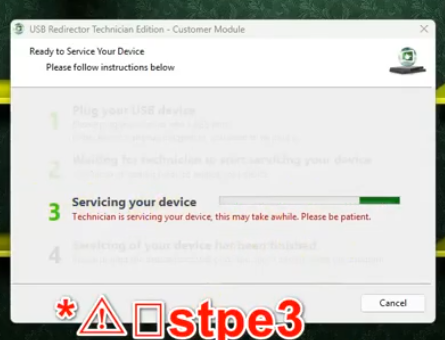
⚠️stpe3 Do not disconnect the cable during the process.

Redmi Poco Mi Frp Via Mi Assistant Mode Usb 197 Port Share

VIDEO HELP WATCH


📱 How to Connect MI Phone in Recovery / Assistant Mode


1️⃣ Power OFF
2️⃣ Press and hold Volume UP + Power
3️⃣ Enter Recovery / Assistant Mode.
5️⃣Connect USB cable. PC/Laptop
recoenct only
⚠️stpe3 Do not disconnect the cable during the process.

Table of Contents

Toggle
    • 📱 How to Connect MI Phone in Recovery / Assistant Mode
  • VIDEO HELP WATCH
  • 📱 How to Connect MI Phone in Recovery / Assistant Mode
    • ### What is Mi Assistant Mode?
    • ### The Solution: USB 1.9.7 Port Sharing
    • ### Step-by-Step Guide for Technicians & Users
    • ### Why Choose GSMXR?
USB 197 DOWNLOAD

### What is Mi Assistant Mode?

Mi Assistant Mode (also known as Sideload Mode) is a built-in recovery state in Xiaomi devices. It allows the phone to communicate with professional service tools over a USB connection without needing to enable “USB Debugging” from within the settings—making it the perfect gateway for FRP removal.

### The Solution: USB 1.9.7 Port Sharing

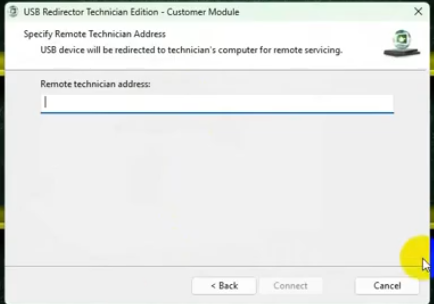
Using USB Redirector 1.9.7, we can bridge the connection between your device and our professional server. This “Port Sharing” method means you don’t need to download heavy software or have technical expertise. We handle the technical side remotely.

Key Features of this Method:

  • All Models Supported: Works on the latest Redmi, Poco, and Mi series.
  • One-Click Process: Once connected, the unlock is nearly instantaneous.
  • Safe & Secure: No risk of bricking your device or losing hardware integrity.
  • Remote Service: Get your phone fixed from the comfort of your home or shop.

### Step-by-Step Guide for Technicians & Users

  1. Enter Mi Assistant Mode:
    • Power off your phone.
    • Press and hold Volume Up + Power Button simultaneously to enter the Recovery Menu.
    • Use volume keys to navigate to “Connect with Mi Assistant” and confirm with the Power Button.
  2. Connect to PC: Plug your phone into your computer using a high-quality USB cable.
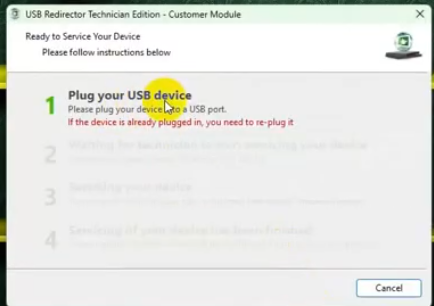
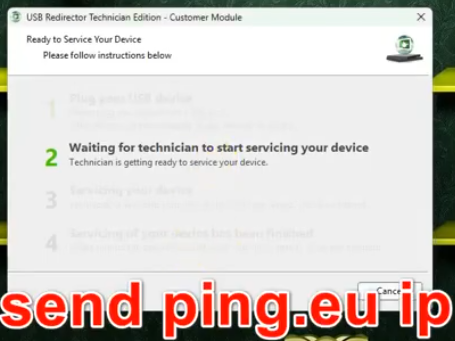
  3. Port Sharing Setup: * Open USB Redirector 1.9.7 on your PC.
    • Enter our remote server IP (provided upon request).
    • Wait for the tool to recognize your device on Step 1 or Step 2.
  4. The Fix: Once the port is shared, we initiate the FRP bypass command. Your phone will automatically reboot, and the Google Lock will be gone!

### Why Choose GSMXR?

We specialize in computerized mobile software solutions. Whether it’s firmware files, mobile repair tools, or remote unlocking services, GSMXR Enterprises is your trusted partner in Delhi and beyond.

Need Help? If you are looking for Mi Account or FRP removal credits, or want us to bypass your device via remote port share, contact us today!
  • WhatsApp/Contact: 9289915006
  • Official Websites:gsmxr.in|gsmxr.com
  • Email: info.gsmxr@gmail.com

Would you like me to create a similar blog post for Mi Account (Mi Cloud) removal, or perhaps help you draft a social media caption for this service?

Related Posts:

  • Nothing Phone 2
    Nothing Phone 2 file | Frp Remove | Pin Unlock
  • Nothing Phone(3a)
    Nothing Phone(3a) Unlock +UnBrick Firmware
  • Nothing Phone(3a) PRO
    Nothing Phone(3a) Pro Frp Pin Unlock Firmware
  • Nothing Phone 1
    Nothing Phone 1 Lock + FRP+UnBrick
  • Nothing Phone 2a
    Nothing Phone 2a FRP+Lock Firmware
  • libusb
    Libusb Win32 Driver Latest Version| New Update
  • redmi 13c
    Redmi 13R 5G (AiR) Mi Account Frp File Free
  • fire
    Redmi 12 ( Fire ) Mi Account FRP Free File
  • Mi 11 Lite 4G
    Mi 11 Lite 4G ( courbet ) Mi Account FRP file
  • cmf
    CMF Phone 1 Flash File/Stock Rom Download
Sharing Is Caring:
Categories usb 197, FlashTool, MiAccount Tags mi frp port share, mi frp unlock, mifrp via ip, Xiaomi account recovery, Xiaomi FRP Solution
Realme C73 5G| Rmx3945 | Project 24727 | Flash File Latest
Windows 11 Driver Fix 1-Click Solution is Best
Admin

Gsmxr.com provide you all mobiles latest flash file to download for free and here you can learn about mobile flashing and unlocking

Contact

category

  • CMF / NOTHING
  • Driver
  • FlashTool
  • MiAccount
  • Oppo
  • paid Tool
  • Realme
  • Samsung
  • Tools
  • Uncategorized
  • usb 197

Latest Post

  • UnlockTool Latest Update download free
  • RMX OTP Realme 1 Click Pin FRP Unlock without file
  • Redmi Note 9 (merlin) Mi Account FRP Unlock File Free
  • Redmi Note 10s (rosemary ) Mi Account FRP Unlock File Free
  • XPT Realme OTP 1 Click Pin FRP Unlock FLashing

Gsmxr.com provide you all mobiles latest flash file to download for free and here you can learn about mobile flashing and unlocking

  • Privacy Policy
  • About Us
  • Contact
  • Disclaimer
  • Terms & Conditions
  • UnlockTool Latest Update download free
  • RMX OTP Realme 1 Click Pin FRP Unlock without file
  • Redmi Note 9 (merlin) Mi Account FRP Unlock File Free
  • Redmi Note 10s (rosemary ) Mi Account FRP Unlock File Free
  • XPT Realme OTP 1 Click Pin FRP Unlock FLashing
Whatsapp Support
  • Privacy Policy
  • About Us
  • Contact
  • Disclaimer
  • Terms & Conditions
© 2026 GSMXR.COM {CREDiT KiNG ABDUL}